On November 25, 2026, 1Password disclosed that an attacker had gained access to an employee’s corporate GitHub account. Not a vault. Not a password database. A GitHub account. From there the attacker copied private source code, reached the CI/CD system and pushed malicious code to backend services that pulled customer account records 1.
I’ve had a lot of questions about this one already, and most of them boil down to the same thing: how does one developer account get you all the way to production, and why didn’t MFA stop it?
The short answer: 1Password hasn’t said how the account was compromised. But the attack class that fits what they describe, device code phishing, doesn’t care about your MFA, and GitHub doesn’t let you turn the flow off. The longer answer is this post.
I’ve spent the last months as a design partner with the Microsoft product group on one specific scenario: detecting and automatically disrupting device code phishing against GitHub Copilot CLI, built on the GitHub connector in Defender for Cloud Apps and GitHub Enterprise Managed Users (EMU). So I’ll cover what happened, how the attack works, what you can and can’t prevent, and what the Defender side actually gives you today.
What 1Password Actually Said
Let’s stick to what’s in the disclosure 1:
- November 19, 2026: 1Password started investigating signs that someone had access to an employee’s corporate GitHub account.
- The attacker used the account to copy source code from private repositories and to reach the CI/CD system, which holds the infrastructure secrets the product needs to run.
- Malicious code was pushed to backend services. That code downloaded administrative data for a subset of customers: names, sign-in email addresses, account and user IDs, creation and last sign-in times, public keys, SRP parameters, tokens embedded in some invitation, provisioning and recovery emails, and other non-secret internal metadata.
- Not affected: vault contents, the keys protecting vaults, account recovery keys, and the apps and browser extensions.
- Remediation: the GitHub account was disabled, the stolen token was revoked and the access the attacker created was removed. All internal credentials that may have been exposed were rotated or revoked. Invitation and recovery codes went from six digits to ten alphanumeric characters. GitHub, CI/CD and endpoint controls were tightened, with new detections for this type of attack. Independent experts were brought in to validate containment.
I want to be precise here. 1Password’s post does not name the initial access technique. What it does say is that they revoked the stolen token. A token, not a password. A stolen token fits device code phishing, which hands the attacker exactly that. It also fits a session token or PAT lifted by an infostealer, or a token leaked some other way. I’m not claiming device code phishing is what happened at 1Password. I’m saying it’s the cheapest way I know to get a token like that from a developer who has MFA, and most GitHub enterprises have no defense against it.
The credit goes to 1Password for the vault design holding up. The architecture did its job. But the path from one employee account to code running in production is the part every one of us should be looking at in our own environments this week.
Device Code Phishing 101 (GitHub Edition)
If you’ve worked with Entra ID for a while, you know device code phishing. Microsoft has tracked it in campaigns like Storm-2372 and EvilTokens 2. What a lot of people missed is that GitHub has the exact same flow, and Praetorian showed back in 2025 how well it works against developers: targets completed the flow more than 90% of the time when contacted by phone, using nothing more than an eight-digit code 3.
The OAuth 2.0 device authorization grant exists for clients that can’t show a full browser: the GitHub CLI, Copilot CLI, IDE extensions. You run gh auth login, get a code, open github.com/login/device, type it in, and the CLI gets a token. Convenient.
The problem: nothing in that flow guarantees that the person who started the sign-in is the person who approves it.
sequenceDiagram
    participant A as Attacker
    participant GH as github.com
    participant V as Victim (EMU user)

    A->>GH: Request device code
public client ID (e.g. Copilot CLI)
attacker picks the scopes
    GH-->>A: user_code + device_code (~15 min)
    A->>V: Lure via email / Teams / phone
"Verify your Copilot license"
    loop Every 5 seconds until approved
        A->>GH: Poll with device_code
        GH-->>A: authorization_pending
    end
    V->>GH: Opens the REAL github.com/login/device
signs in with Entra SSO + MFA (if needed)
enters code, approves
    A->>GH: Next poll with device_code
    GH-->>A: OAuth token (repo, read:org, ...)
    Note over A: No password. No MFA prompt.
Full access within the granted scopes.
This is the lure I used in my lab. No malicious link, no attachment, nothing for a filter to detonate. Just the real https://github.com/login/device and a code:
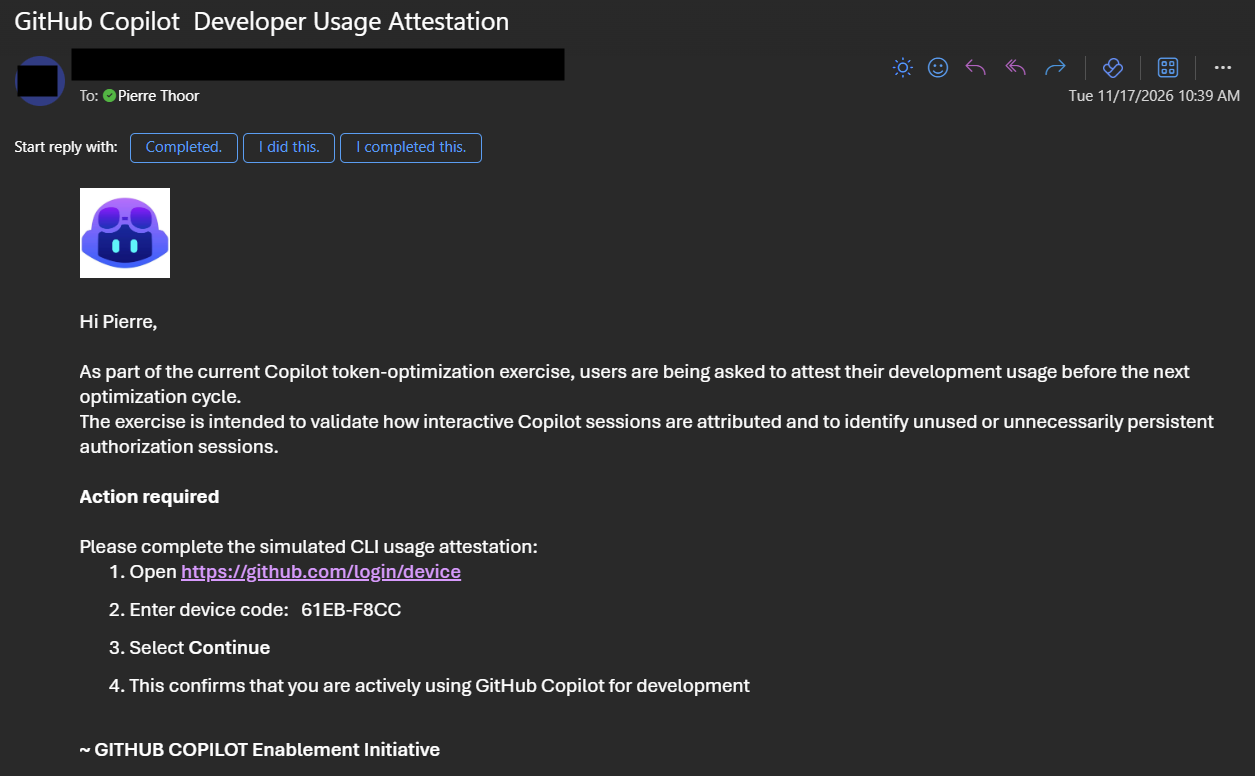
Look at how ordinary it is. A “token-optimization exercise”, an “attestation”, and four steps that all happen on github.com. Any developer who has been asked to justify a Copilot license this year will recognize the tone.
A few things make this nasty:
- The client ID is public. The attacker doesn’t need to register anything. Microsoft’s research used the Copilot CLI client and Praetorian used the VS Code client 2. Any first-party client with device flow enabled works, and the attacker chooses the scopes when starting the flow 2. In Microsoft’s simulation that was
repo,read:user,read:org,gistandcodespace. - The victim is on the real GitHub. No look-alike domain. Your phishing training that says “check the URL” works against you here.
- MFA, passkeys, FIDO2 — all of it passes. The victim authenticates themselves, legitimately. The attacker just collects the result.
- The 15-minute window is no longer a limitation. Tools like GitPhish generate the code dynamically when the victim lands on the page 3.
And with AI coding agents in the picture it gets worse. Microsoft’s research shows that a token obtained this way against Copilot CLI can open the door to private repositories, cloud-synced sessions and memory poisoning. If remote control is enabled and allowed by policy, it can even be used to steer an active agent session 2.
Why You Can’t Just Turn It Off
This is the part that frustrates me the most, and the reason I care so much about the detection side.
Since March 2022, device flow has been opt-in per app 5. That’s great for OAuth apps and GitHub Apps you own: leave it off. But for first-party clients like the GitHub CLI and Copilot CLI it’s on, and as of writing I haven’t found any enterprise or organization policy that disables device flow for those clients. Praetorian came to the same conclusion 3.
“But we have Conditional Access blocking device code flow!” Good, keep it. But think about where the flow happens. With EMU and OIDC, your user signs in to github.com via Entra ID. The device code approval then happens on GitHub, and the token is issued by GitHub. The Entra authentication flows condition only sees Entra’s own device code flow. It never sees this one.
So prevention is out of reach for now. What’s left is limiting where a stolen token works, and catching and killing it fast.
Limit Where a Stolen Token Works
The closest thing to a preventive control is network-based. On GitHub Enterprise Cloud you pick one of two options 6:
- GitHub’s enterprise IP allow list. It covers web, API and Git access, including PATs, OAuth app tokens, SSH keys and GitHub App tokens 6. An OAuth token minted through device flow and used from attacker infrastructure hits the wall when it tries to reach your private repositories.
- Your IdP’s Conditional Access policy (EMU + Entra ID + OIDC only). GitHub enforces the IP conditions of your CA policies for API and Git requests made with user credentials, and for web sessions (that part is still in public preview) 7.
You can’t stack them: switching to your IdP’s allow list deactivates GitHub’s IP allow list configuration for every organization in the enterprise 6.
I’ll be upfront about the trade-offs:
| Consideration | What it means |
|---|---|
| Only IP conditions | GitHub can’t enforce device compliance from your CA policy. MFA is only enforced at the IdP sign-in 7. |
| “Skip IdP check for applications” | If you turn this on, installed GitHub Apps and OAuth apps get through from any IP. Know what you are exempting 6. |
| Codespaces and github.dev | Dynamic IPs, so expect them to break unless you plan for it 7. |
| GitHub Actions with PATs | Will likely be blocked. Use a CAP-exempt service account, or better, stop using PATs 7. |
| It doesn’t stop the token being minted | It limits where the token is useful. The victim still handed it over. |
Is it a lot of work in a large enterprise with remote developers? Yes. Is it the only thing that stands between a phished token and your source code today? Also yes.
There’s one more network control to consider. Praetorian suggests blocking the device login endpoint at your network edge 3. On managed devices, that stops a victim from approving an attacker’s code from behind your proxy. It also blocks your own developers from using gh auth login and Copilot CLI sign-in the normal way, and it does nothing for a phone or a home laptop. Test it on a pilot group before you roll it out.
What Defender for Cloud Apps Brings Now
This is the scenario I worked on with the product group as a design partner: device code phishing against GitHub Copilot CLI. The GitHub connector in Defender for Cloud Apps has been around for a while. The new piece is the Enterprise-level connector, combined with detections and automatic attack disruption for device code phishing 8.
Connect at the Enterprise level
You can set up the connector at the Organization or Enterprise level. Go Enterprise. It’s the recommended option, it covers every organization with a single connector, and it’s the one that unlocks the advanced detection and disruption capabilities 8.
You pick the level in the Connection level step of the connector wizard (Settings → Cloud Apps → App Connectors → Connect an app → GitHub):
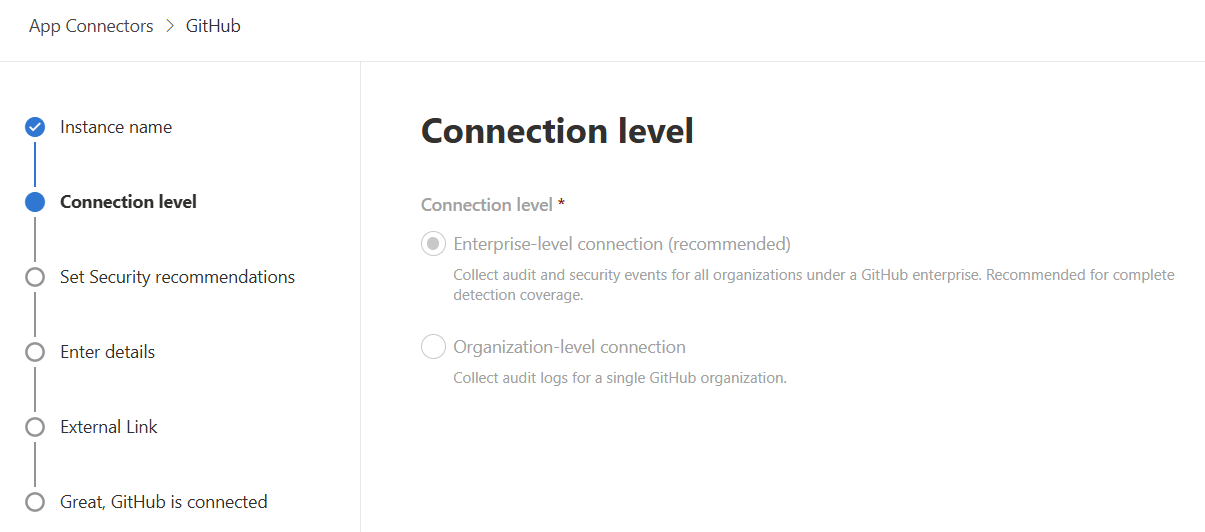
The Enterprise connector only asks for read-only scopes: read:user, user:email, read:enterprise and read:audit_log. The account that authorizes it needs to be an Enterprise owner 8. Two things to know before you click Connect:
- Connecting at Enterprise level automatically disables your existing Organization-level connectors in that enterprise, to avoid duplicate events.
- You get 7 days of events prior to connecting. Not more.
Prerequisites — read these carefully
The detection doesn’t live in one product. It correlates email, Teams, clicks and GitHub OAuth activity, so you need all of the pieces 9:
- Microsoft 365 E5, Defender for Office 365, and the Defender for Cloud Apps connector for Microsoft 365
- Safe Links enabled for email and Teams, with Track user clicks turned on
- The GitHub connector at Enterprise level
- GitHub EMU. The telemetry needed for this detection is only available for EMU users today
- For disruption: EMU federated with Microsoft Entra ID
If you’re on a classic GitHub Enterprise with personal accounts, this one isn’t for you yet. Another good reason to have the EMU discussion.
The detections
| Alert | MITRE ATT&CK | Severity |
|---|---|---|
| Suspected GitHub Copilot CLI device code phishing via email | T1566.002, T1528 | High |
| Suspected GitHub Copilot CLI device code phishing via Microsoft Teams | T1566.002, T1528 | High |
The logic correlates a suspicious message and click with the GitHub OAuth token activity that follows 2.
Automatic attack disruption
This is the bit I’m most excited about. When the alert fires, Defender XDR automatically disables the affected EMU user by suspending the managed identity through your identity provider 9. No SOC analyst waking up at 3 AM to figure out what a GitHub OAuth event means. The goal is to cut the account off before the attacker has done much with it.
Microsoft’s guidance for a true positive is to verify that the disruption action actually ran, and to suspend or disable the EMU account manually if it didn’t 9. Put that check in your playbook.
Here’s what it looked like in my EMU lab:
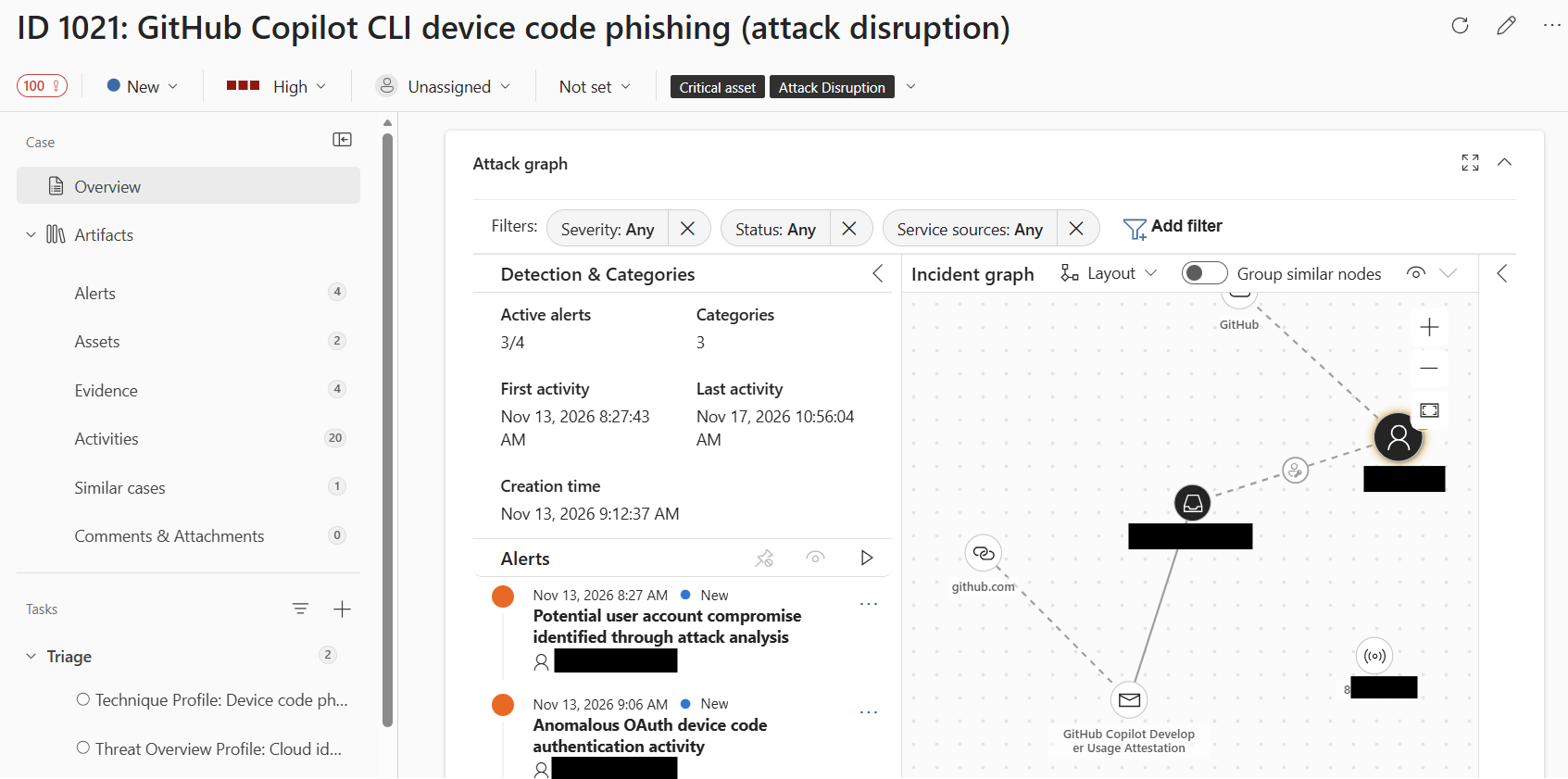
The incident is tagged Attack Disruption and Critical asset. The graph connects the lure email (“GitHub Copilot Developer Usage Attestation”), the github.com link, the mailbox and the user in a single view. That’s the cross-product correlation the prerequisites are there for.
The disruption itself shows up as its own action on the incident:
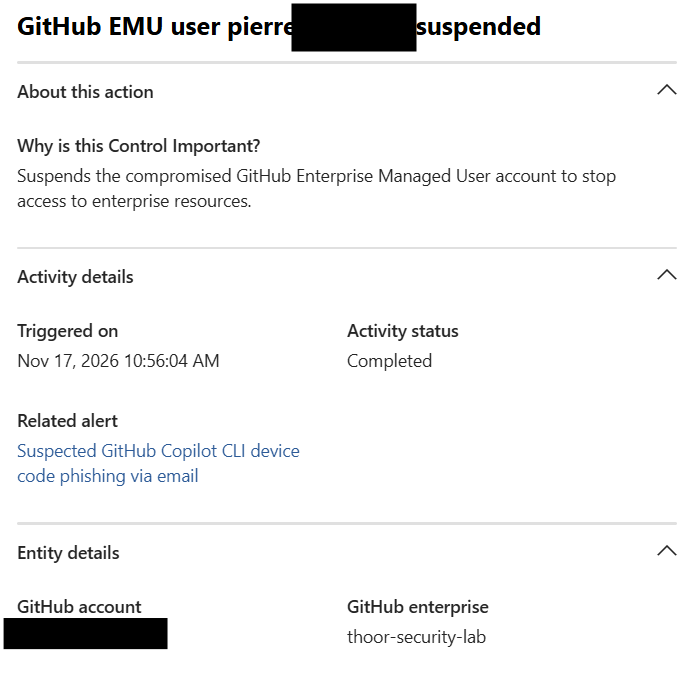
The GitHub EMU user suspended action was triggered by the Suspected GitHub Copilot CLI device code phishing via email alert and reports Completed. This is where you check that disruption actually ran, as Microsoft’s true-positive guidance tells you to 9. The action lists both the GitHub account and the GitHub enterprise, so you know exactly which identity was cut off and where.
The attack disruption was a really good experience. It didn’t take long before my account was suspended and I was locked out of GitHub. To get back in, I had to sign in again through Entra ID and pass Conditional Access. That’s exactly what you want: the attacker is cut off, and the only way back is through the front door, where your identity controls live.
My take: know where the edges are
I think this is a really good first step, and it’s the first time I’ve seen a native XDR response that reaches into GitHub. But it is a first step, it’s in preview, and I’d be doing you a disservice if I didn’t point out the edges:
- It’s scoped to Copilot CLI, by design. That’s the scenario we built and tested, and it’s the right place to start: an AI coding agent holding a repo-scoped token is a very attractive target. But other device-flow clients can be abused too 3, so don’t read the Copilot CLI alerts as coverage for the GitHub CLI, VS Code or other public clients.
- The correlation starts with an email or Teams lure. My read of the logic is that a lure over a phone call, SMS or a third-party chat doesn’t give Defender the click signal to correlate on. Praetorian’s 90% was with a phone call 3.
- EMU only. Already said, but it matters.
So: turn it on, but don’t make it your only layer.
And I want more scenarios. It feels like almost every day now we see someone’s GitHub account get hacked, and the attacker takes over repositories and pipelines and turns them malicious. 1Password is just the latest name on that list. Yet I don’t see many organizations thinking hard about securing their code.
For me, GitHub is a Tier 0 system. It holds your code, your pipelines and the identities that deploy to production. Treat it that way:
- Privileged access workstations (PAWs) for the people who administer it.
- Separate accounts for admin work and everyday development.
- More logging, and logging that actually reaches the SOC.
- Hardening of GitHub and every other code platform you run, not just the one in the headlines.
The SOC needs this telemetry to stop malicious intent before it turns into a production incident.
Hunt for It Yourself
With the connector in place, GitHub activity lands in CloudAppEvents. Before you write anything clever, check which action types your tenant actually receives:
CloudAppEvents
| where Timestamp > ago(7d)
| where Application == "GitHub"
| summarize Events = count() by ActionType
| order by Events desc
You can also filter on the application ID instead of the name. GitHub is 11760:
CloudAppEvents
| where ApplicationId == 11760
Then a starting point for looking at OAuth and token activity per user:
CloudAppEvents
| where Timestamp > ago(30d)
| where Application == "GitHub"
| where ActionType startswith "oauth_" or ActionType startswith "personal_access_token"
| extend Country = tostring(RawEventData.actor_location.country_code)
| project Timestamp, AccountDisplayName, ActionType, Country, RawEventData
| order by Timestamp desc
Look for new authorizations for CLI clients from users who don’t normally use them, and from countries that don’t match where the user actually works.
Notice that Country comes from RawEventData, not from the CountryCode column. In my lab, IPAddress, CountryCode and ISP were all empty for these events, because GitHub doesn’t include a source IP unless you turn that on (more on that below). The country is in the raw event either way.
The real detail is in RawEventData, which holds the original GitHub audit log event. Here’s the token event from my lab when the phished code was approved (identifiers redacted):
{
  "action": "oauth_access.regenerate",
  "actor_location": { "country_code": "SG" },
  "oauth_application_name": "GitHub Copilot CLI",
  "operation_type": "modify",
  "token_id": "<redacted>",
  "hashed_token": "<redacted>",
  "token_scopes": "codespace,gist,read:org,read:user,repo,write:plugin_gateway_connections",
  "user_agent": "copilot/1.0.112 (win32 v24.22.1) term/unknown"
}
A few things stand out:
- It’s
regenerate, notcreate. My user had used Copilot CLI before, so approving the attacker’s code regenerated the existing authorization. Hunt for both. - The client name and scopes are right there.
GitHub Copilot CLIwithrepoandcodespaceis exactly what you’d expect from the attack. - You get a country even without an IP address.
actor_location.country_codeis filled in even when the event has no IP. hashed_tokenis your pivot. It identifies the token, so you can follow what that token did next.
So pull those fields out and look at them directly:
CloudAppEvents
| where Timestamp > ago(30d)
| where Application == "GitHub"
| extend GitHubAction = tostring(RawEventData.action),
         OAuthApp     = tostring(RawEventData.oauth_application_name),
         Scopes       = tostring(RawEventData.token_scopes),
         Country      = tostring(RawEventData.actor_location.country_code),
         UserAgent    = tostring(RawEventData.user_agent),
         HashedToken  = tostring(RawEventData.hashed_token)
| where GitHubAction in ("oauth_access.create", "oauth_access.regenerate", "oauth_authorization.create")
| where OAuthApp in ("GitHub Copilot CLI", "GitHub CLI")
| project Timestamp, AccountDisplayName, GitHubAction, OAuthApp, Scopes, Country, UserAgent, HashedToken
| order by Timestamp desc
Check the countries and user agents against where and what your developers actually work from. When something looks off, take the HashedToken and search for it across all GitHub events to see what the token touched.
One thing that catches people out: GitHub doesn’t show source IP addresses in the audit log by default. That’s why the IP columns were empty. Turn on Enable source IP disclosure under your enterprise’s Settings → Audit log → Settings if you want the actual IP to hunt on, not just a country 10.
Shrink the Blast Radius
Detection is half the story. The other half is the part of the 1Password incident I keep coming back to: one developer account was enough to push code that ran in production and to reach CI/CD secrets 1. Here’s that path from the disclosure, with the controls that could have stood in the way:
flowchart LR
    A["Employee GitHub account
(stolen token)"] --> B["Private repositories
source code copied"]
    A --> C["CI/CD system
infrastructure secrets"]
    A --> D["Malicious code pushed
to backend services"]
    D --> E["Customer account
records downloaded"]

    X1(["IP allow list / IdP CAP"]) -.->|"token useless off-network"| A
    X2(["MDA detection + disruption"]) -.->|"EMU user suspended"| A
    X3(["Rulesets + required reviews"]) -.->|"no direct push"| D
    X4(["Environment protection"]) -.->|"merge is not deploy"| D
    X5(["OIDC, no stored secrets"]) -.->|"nothing to steal"| C
Even if you never catch the phish, this is what limits the damage:
- Rulesets on default and release branches. Require pull requests, required reviews and CODEOWNERS approval, and no bypass for regular users. A phished token should not be able to push straight to
main. - Environment protection rules. Production deployments need required reviewers and restricted deployment branches. A merged commit shouldn’t equal a deployed commit.
- No long-lived secrets in CI/CD. Use OIDC federation to Azure with workload identities scoped per environment. If there’s nothing to steal, there’s nothing to rotate.
- Separate identities for build and deploy. The identity that runs tests on a PR should never be the one that can deploy. Incidents like this one are exactly why.
- Least privilege on repositories. Use organization roles so one compromised account reaches as little code as possible 2.
- Review authorized OAuth apps regularly and revoke what you don’t recognize 2.
What to Tell Your Developers
One sentence, repeated until it sticks: only enter a device code for a sign-in you started yourself. An unexpected “verify your Copilot license” or “IT needs you to confirm your GitHub access” is phishing, even when the link goes to github.com 2.
And if they think they did approve one: check Settings → Applications → Authorized OAuth Apps, revoke it, and tell the SOC. Right away.
Summary
- The 1Password incident went from one employee’s GitHub account to source code, CI/CD and production 1. How the account was compromised hasn’t been disclosed.
- Device code phishing on GitHub bypasses MFA and passkeys, uses the real github.com, and as far as I can find can’t be disabled for first-party clients today.
- Entra Conditional Access doesn’t see GitHub’s device flow. GitHub’s IP allow list, or IdP CAP with EMU + OIDC, is the closest thing to prevention.
- Defender for Cloud Apps with the Enterprise-level GitHub connector now detects device code phishing against Copilot CLI and automatically disables the EMU user through Entra. It requires EMU, E5, and MDO with Safe Links click tracking, and it’s in preview.
- Branch rulesets, environment protection and OIDC instead of secrets are what keep a phished token from becoming a production incident.
If you run GitHub Enterprise and haven’t moved to EMU yet, this incident is a pretty strong argument.
If you’ve tested this in your own EMU enterprise and seen something different, I’d love to hear about it.
References
Ref 1
1 1Password, “Update on a security incident involving 1Password’s backend systems,” November 25, 2026. 1Password blog Back to text
Ref 2
2 Microsoft Security Blog, “The risks of device code authentication for AI coding agents,” November 17, 2026. Microsoft Security Blog Back to text
Ref 3
3 Praetorian, “Introducing: GitHub Device Code Phishing,” June 12, 2025. Praetorian blog Back to text
Ref 4
4 Cyber Security News, “GitPhish – A New Tool that Automates GitHub Device Code Phishing Attack.” Article Back to text
Ref 5
5 GitHub Changelog, “Opt in needed to keep OAuth Device Authorization Flow working,” March 2, 2022. GitHub Changelog Back to text
Ref 6
6 GitHub Docs, “Restricting network traffic to your enterprise with an IP allow list.” GitHub Docs Back to text
Ref 7
7 GitHub Docs, “About support for your IdP’s Conditional Access Policy.” GitHub Docs Back to text
Ref 8
8 Microsoft Learn, “Protect your GitHub Enterprise environment.” Microsoft Learn Back to text
Ref 9
9 Microsoft Learn, “Protect AI agents from trusted-identity attacks (preview).” Microsoft Learn Back to text
Ref 10
10 GitHub Docs, “Displaying IP addresses in the audit log for your enterprise.” GitHub Docs Back to text